
Build and reorder
Add songs through a searchable picker and drag to reorder while the setlist is explicitly in Edit mode.
gigPrompter v1.0
Edit the chart, build the set, control the performance, keep nearby Band Members synchronized, and send clean lyrics to an external display from one iPhone or iPad app.

Editable song library
gigPrompter stores canonical songs as UTF-8 text. Song metadata includes title, artist, key, BPM, time signature, measures per displayed line, and notes, followed by exact chord/lyric pairs.


Import and conversion
Plain text and ChordPro-style material can be imported directly. Text PDFs use Apple PDF extraction, while scanned PDFs can use on-device OCR. Converted material opens as editable song text before saving.
Setlist control
gigPrompter tracks each occurrence in a setlist and gives the Leader explicit ways to handle requests, jumps, replays, and song-end behavior.
Add songs through a searchable picker and drag to reorder while the setlist is explicitly in Edit mode.
Load a requested song without losing the planned position. The performer still decides when playback begins.
Jump to a selected position and continue the set from there while earlier entries are treated as skipped.
Current, upcoming, played, and skipped states stay visible for each setlist occurrence.
Play and Stop can leave a completed song on screen for Previous, Replay, Next, or Exit instead of immediately leaving Performance.
Choose automatic setlist advancement when the next unplayed song should begin after natural song completion.
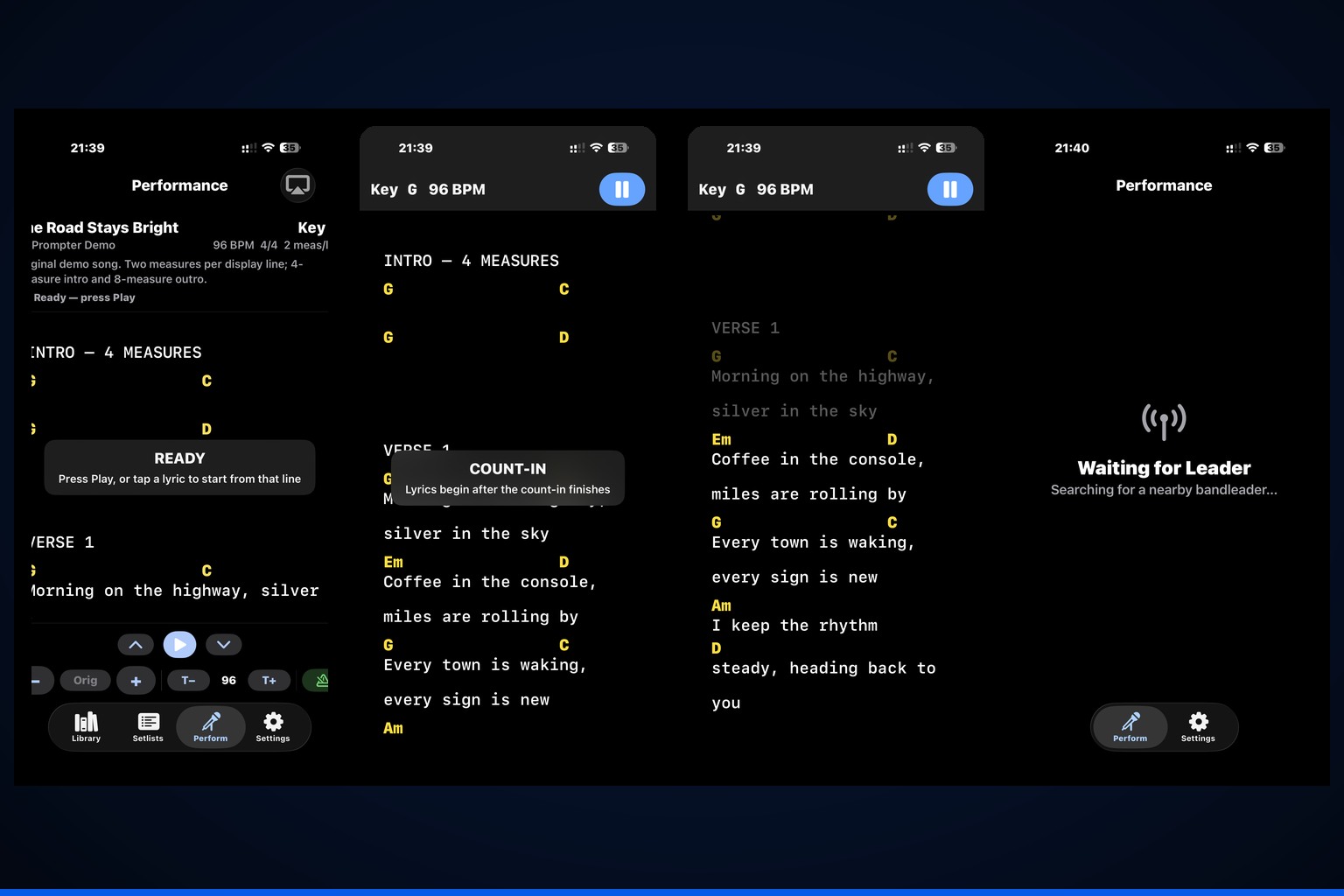
Smooth performance view
gigPrompter calculates scrolling from BPM, time signature, and measures per displayed line. The visual movement is smooth across the interval rather than jumping only at the line boundary.
Leader + Band Member mode
A Leader broadcasts the live song position to nearby Band Members while keeping performance control one-way and predictable.
One Leader can stream the active performance to as many as six nearby receive-only listeners.
Band Members do not send transport, tempo, transpose, or manual-position commands back to the Leader.
Each Band Member keeps local text size, display color, and orientation settings.
A Band Member can choose a local capo position and see chord shapes transposed to match while the sounding key remains aligned with the Leader.
Band Members receive the Leader’s one- or two-measure count-in length while choosing their own local flash/tick presentation.
Members can leave and reconnect without changing the Leader’s performance state or affecting other connected musicians.
Hands-free control
Bluetooth pedals pair through iOS as keyboard/HID devices. gigPrompter captures the transmitted keys and maps them to performance actions.
Transport stays intentional: only the Play/Pause action changes Play/Pause state. Line, key, tempo, and metronome adjustments preserve the current state.

Music tools
Key, tempo, capo, chord notation, metronome, and count-in controls are part of the same performance workflow.
Transpose conventional and slash chords temporarily, choose sharp or flat names, or restore the original key instantly.
Use the built-in Nashville-number conversion engine for number-based chord reference.
Cycle Off, Flash, Flash + Tick, and Tick Only with downbeat-aware visual and audible timing.
Choose one or two measures with Follow Metronome, Flash, or Flash + Tick presentation and separate local tick volume.

HDMI / AirPlay
gigPrompter uses an independent external-display scene for AirPlay or HDMI. Lyrics-only congregation output can use images or slideshows selected in setlist setup.
Perform access
Eligible new subscribers can start Apple’s native one-week introductory free trial on a qualifying monthly or yearly Perform plan.
Apple controls eligibility and the trial clock. During an eligible trial, Leader and Member Perform are fully enabled.
Without a current entitlement, Library, setlists, editing, imports, setup, and Settings remain usable as applicable.