
PortableiPhone and iPad
 gigPrompter v1.0
Teleprompter songbook for musicians
Your songs.
Your stage.
Your gig.
gigPrompter keeps editable songs, setlists, chords, tempo, hands-free controls, nearby bandmate displays, and external lyrics output together in one stage-ready iPhone and iPad workflow.
Affordable
Portable
Easy to use
Built for live performance

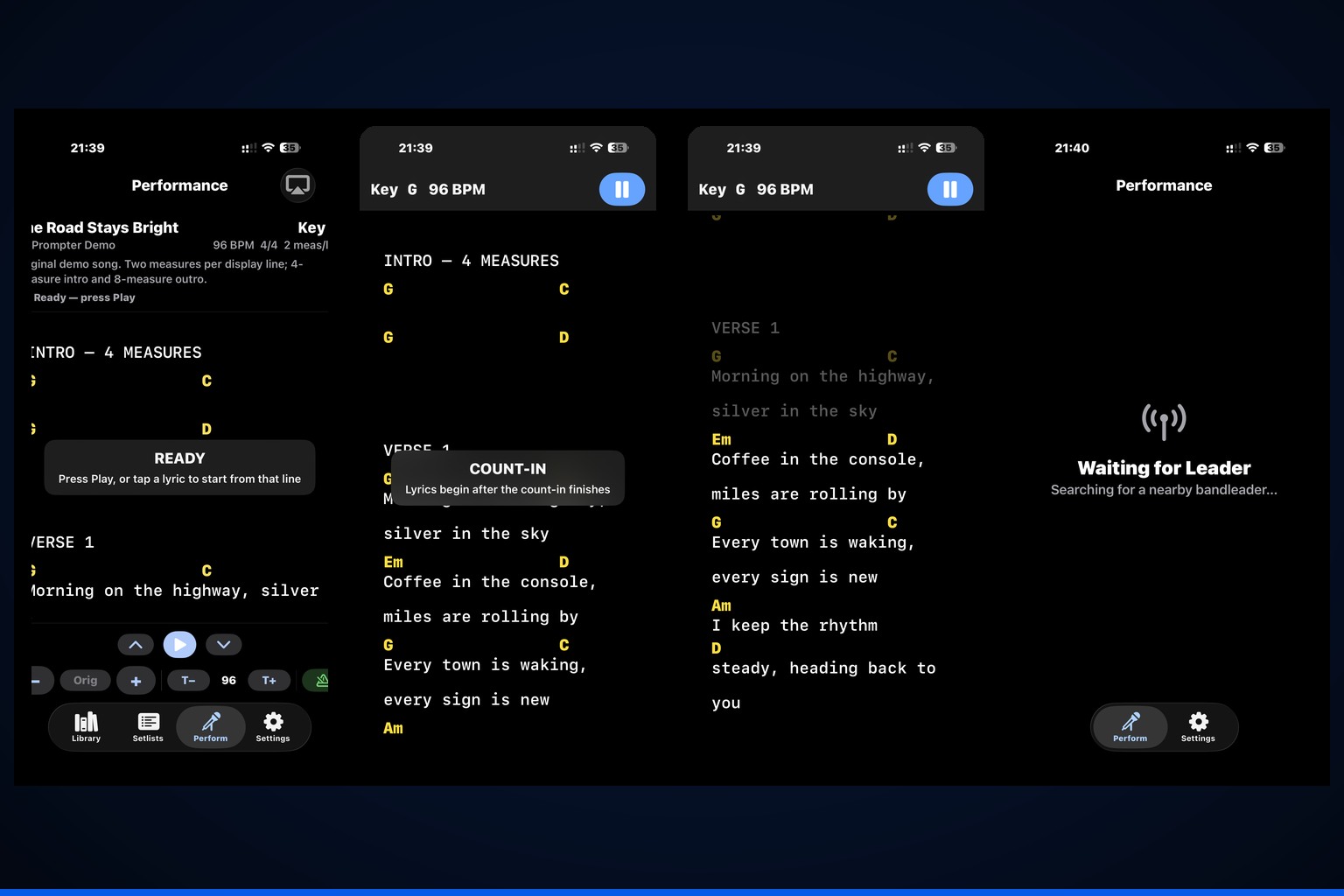
Stage-ready performanceLyrics, chords, tempo, set position
Leader + up to six Band MembersNearby receive-only performance synchronization.
EditableReal text songs—not static performance PDFs
Hands-freeProgrammable Bluetooth pedal mapping
ExpandableHDMI and AirPlay lyrics output
One performance workflow
Prepare on the same device you use on stage.
Create or import songs, edit the chart, organize the set, then move into a smooth tempo-aware performance view that can stay synchronized with nearby Band Members and an external display.
Core capabilities
From editable chart to synchronized performance.
gigPrompter v1.0 combines the tools musicians use before and during a show without turning the stage workflow into a desktop-style production system.
Editable songbook
Create and edit UTF-8 text songs with preserved chord spacing, structured fields, raw text, preview, notes, key, BPM, time signature, and measures per displayed line.
Text and PDF import
Import plain text, ChordPro-style charts, text PDFs, or scanned PDFs with on-device OCR, then edit the converted song before saving.
Flexible performance setlists
Build and reorder sets, track current/played/skipped songs, use Play Now for requests, Play From Here to jump ahead, and choose automatic advance or Play and Stop.
Smooth performance scrolling
Use BPM- and time-signature-aware smooth scrolling, start from a tapped lyric, or finger-scroll the Leader view while playing without changing Play/Pause state.
Leader + Band Member mode
A Leader can stream song position and count-in to up to six nearby receive-only Band Members over the local network.
Transpose and local capo
Transpose conventional and slash chords, choose sharps or flats, restore the original key, use Nashville numbers, and let each Band Member set a local capo position.
Programmable Bluetooth pedal control
Map HID pedal keys to Play/Pause, line and song navigation, key changes, tempo changes, and metronome mode. Adjustment actions preserve the current transport state.
Metronome and count-in
Choose Off, Flash, Flash + Tick, or Tick Only, set one- or two-measure count-ins, and control local tick presentation and volume.
HDMI / AirPlay output
Send an independent external display with lyrics-only congregation output and optional setlist-controlled image or slideshow backgrounds.
Stage display customization
Adjust text size, orientation, lyric and chord colors, dim passed lyrics, bold chords, keep the screen awake, and tailor Member display settings locally.
Local-first privacy
Songs and setlists stay on the device. No gigPrompter account, advertising SDK, analytics SDK, tracking, or developer-operated song upload is required.
7-day Perform trial
Eligible new subscribers can start Apple’s native one-week introductory free trial on a monthly or yearly Perform plan. Without an active entitlement, non-Perform library and editing tools remain available.

Designed for live stages
Smooth, controllable prompting
Stay with the song without surrendering control.
Performance scrolling follows BPM, time signature, and measures per displayed line. The Leader can also finger-scroll while the song is playing; gigPrompter re-centers the selected musical row, keeps playback running, updates connected Band Members and the external display, then resumes timed scrolling.
- Smooth BPM-based scrolling
- Tap a lyric to begin from that line
- Manual Leader repositioning without pausing
- Key and tempo changes preserve transport state
- Display colors, bold chords, dim-passed-lyrics, and screen-awake controls
Leader + Band Members
Keep nearby musicians on the same position without giving up individual display preferences.
One Leader can broadcast the active song position and count-in to up to six nearby receive-only Band Members. Each Member keeps a local text size, orientation, display appearance, and capo position while the Leader remains the only performance controller.
- Up to six nearby Band Members
- Receive-only Member performance mode
- Local Member capo position with chord-shape transposition
- Local Member display size and orientation
- Silent departure and reconnect behavior

Made for working musicians
One portable tool for different kinds of stages.
Use gigPrompter as a personal lyric monitor, chord chart library, setlist controller, band performance source, or congregation-lyrics system.


Solo performers
Carry editable lyrics, chords, notes, tempos, set order, metronome, and hands-free controls on one iPhone or iPad.
Cover bands
Handle requests with Play Now, jump with Play From Here, transpose quickly, and keep up to six nearby Band Members on the same song position.
Worship teams
Keep musician chord charts on their devices while sending lyrics-only congregation output over HDMI or AirPlay with image or slideshow backgrounds.
Rehearsals
Import and edit charts, set BPM and count-in, refine keys and capo positions, and use the same local song files on stage.
Wedding and event musicians
Keep special requests, cues, introductions, alternate keys, and flexible setlist order available during one-off performances.
Cue-heavy productions
Use section/cue rows, notes, programmable pedal commands, manual Leader repositioning, and external lyrics output for structured shows.
Simple by design
From import to performance in four steps.
The interface follows the way musicians prepare and perform: create the chart, shape the set, choose the stage controls, and play.
-
01
Import or create
Start with text, ChordPro-style material, or PDF conversion. Imported material opens as editable song text before saving.
-
02
Edit precisely
Use structured fields, raw text, or preview while literal chord spacing, blank rows, notes, key, BPM, and timing stay intentional.
-
03
Build the set
Reorder songs, choose automatic advance or Play and Stop, take a request with Play Now, or jump with Play From Here.
-
04
Perform
Use smooth scrolling, programmable pedal controls, Leader/Band Member synchronization, metronome/count-in, and independent HDMI/AirPlay output.

Congregation and presentation output
Show the audience lyrics without showing the musicians’ chart.
The independent HDMI/AirPlay scene can present lyrics-only output while performers keep chords and controls on their own devices. Setlist setup can apply local background images or slideshows to the external lyrics display.
- Lyrics-only external output
- Setlist-level or per-position background imagery
- Image or slideshow presentation
- External metronome tick muting
Perform access
Try the full performance workflow for seven days.
Eligible new subscribers can start Apple’s native one-week introductory free trial when choosing a qualifying monthly or yearly Perform plan. Apple manages eligibility, timing, renewal, and cancellation.
7-day introductory free trial
During an eligible trial, Leader and Member Perform are fully enabled with no per-song limit.
Non-Perform tools remain available
Without a current Perform entitlement, Library, setlists, editing, imports, setup, and Settings remain usable as applicable.